 Recently several associates in the community radio industry have asked me for tips and useful plugins that I have used on site like One Media Group and Cre8 Radio. So I’ve pooled together some great tools that can help make a WordPress system work for a radio station; useful if you’re on a budget!
Hosting
I won’t tell you where to go, but firstly you need to buy hosting and install WordPress on it if you want to have great flexibility. The sites on WordPress.com are only good for personal blogs and don’t have the functions required to use many of the tools below. You can find suggested hosts on the WordPress.org website at www.wordpress.org/hosting, but do look around elsewhere.
Personally, I use Tsohost. They are a great UK based company that provides 24/7 support (genuinely, I asked a question at 11:30pm and they replied in 20 minutes!) and even offers free whole website migration with some hosting packages. And with the coupon code “WordPress Rocks!” you can get 10% off any hosting package! Just enter it when placing your order.
Themes
Choosing your theme is essential, but don’t just look at the theme and take it as it is. Many sites take a template and then modify it to suit them. Whether that be a colour change or simply moving things about, beyond the widget function. If you have HTML, PHP & CSS knowledge then it will be very beneficial! If you can, stretch to a budget. Most good themes do cost a bit of money, usually between £20-£40, including exchange rates from American websites. Sites I would suggest for premium themes are WooThemes and ThemeForest. I don’t find the WordPress.org Free Theme Directory too useful, however the WP Theme category on Smashing Magazineis full of gems. Or you could always spin off your own WordPress theme which would give you exactly what you want, but may take a bit longer.
If you purchase a theme and it doesn’t support smart phones, why not try the plugin WPtouch. It is basically a theme which is only activated when users visit on a smart phone. There are lots of choices within the free version, however the paid version ($49/£31) does give you a lot more features like using custom menus and inline replies.
Bundles
There are two very useful bundles available for free, which contain some amazing features.
Jetpack for WordPress – jetpack.me
This bundle comes with WordPress and to activate it you must link it to a WordPress.com account. That account is free, easy to do and complete with a how to within the bundle. Notable features include WordPress.com Stats, Jetpack Comments, Sharing, Contact Form and Shortcode Embeds. All of which you should activate and configure upon installing Jetpack. I’ll talk about some of these later on.
This is already the second time I’ve mentioned WooThemes! Their WooDojo bundle brings features like Branded Login, Maintenance mode and Widget Previewing. Features here are ones where you’d usually have to install a separate plugin for each one, however they are bundled together nicely here along with simple settings. Definitely several here I use all the time!
Plugins
Here are some of the plugins I use to enhance the radio stations that I have on WordPress. I will refer to some of the features within Jetpack and WooDojo, but alongside others I’ll include links to their WordPress plugin pages.
URL Shorteners
WP.me Shortlinks – part of Jetpack
If you really want WP.me short URLs then you can use this as part of Jetpack. You can’t choose any other short domain or services and it doesn’t post automatically to Twitter.
WooDojo ShortLinks – part of WooDojo
Just like WP.me this will automatically generate your short URL, but you have the choice of TinyURL or bitly. If you hook in your Bitly username and API key you can use the bitly services and even your own short URL!
Having installed my own version of YOURLS I gave their WordPress plugin a go. I find this much easier to use then some of the others. It automatically posts to Twitter and can use a variety of short URL services, including the bitly custom domain setting.
Comment Systems
Facebook Comments
On the One Media Group website, I decided that as our audience were students, Facebook would be an ideal platform to use for our comments. I gave our management team moderator rights to the Facebook platform and then used the Facebook Comments for WordPressplugin to replace the standard comments system provided by WordPress. There are ways to implement it yourself, however using a plugin means that any API changes that Facebook makes, the maker of the plugin should keep them up to date for you. However do keep an eye plugins when using third-party services like Twitter & Facebook as they may break if the social networks change something very quickly.
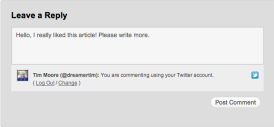 Jetpack Comments – part of Jetpack – Jetpack.me/support
This recent addition to Jetpack seems to take care of wanting to allow users to login using Facebook or Twitter accounts when commenting. It builds right into the main commenting system of WordPress so uses all the regular settings you make in the Discussion panel.
I’ve used this plugin before as I didn’t know about other alternatives. This requires you to make a Disqus account and moderate via their platform. I would now opt for other ways of sorting out comments however it might have something you want that others don’t.
Schedules
I always get asked how to do schedules in WordPress for a radio station.
I’ve worked with my good friend Christopher Smith to pull together a system that uses a text file and a series of PHP files to extract information. These files also are configured to generate an on air now, and on air next display. However this isn’t a fail safe system and it does require a lot of setup.
What other options are there?
How to Make a Radio Station Schedule Using WordPress – Wptuts+ tutorial
This tutorial shows how you can use custom post types to generate your own schedule. For my liking it is rather messy as you have to create lots of different posts with the information. However you can add descriptions easily, plus if you want to change it slightly you can as you go along.
Whilst this plugin is primarily for TV schedules, it does double up nicely as a radio weekly schedule. You can have multiple schedules and display the show description either in the table itself or in a popup window. It also has categories so you can distinguish your speech-based content versus your daytime or specialist shows.
Using a Google Calendar is also a practical way to display your schedule, even if it does require putting in every single show manually. You could also share your calendar with other managers at the station so that it can be changed by others. It is possible then to embed the calendar in an iframe upon a normal WordPress page.
Timetable for WordPress (Paid – $20/~£12) – Codecanyon.net
This plugin was suggested by reader Satnam Rattu.
If you’re looking for something with a bit more flexibility, without the coding work, then this plugin could work for you. It boasts a selection of pre-defined skin colours and a neat side-scrolling feature.
Content Enhancements
You’ve probably seen this player if you’ve been looking at websites with audio on. It is easy to install and comes with lots of customisation options, including a nice colour picker for the player. There’s also a button in the Media window when you add audio to a post, which makes embedding audio very easy.
However, if you are expecting a large amount of iOS or Android users to visit your site, it might be best to avoid this as it is purely Flash based.
You can run polls for your users and also editors/admins using this plugin. Controlling the polls are relatively easy with expiry dates and multiple choice results.
Admin Tools
If you’re planning to have lots of users who will be logging in to provide content for your site, then you may want to watch what permissions they have more closely. Whilst the Editor/Author/Contributor model is okay, with Advanced Access Manager plugin you can create your own model for user access. You can create a new user type based on the original ones and then customise it as you wish.
A nice plugin that will help you keep a backup of your precious database. Either download, email or simply save the core database to your server. There’s even the option to add additional information from other plugins. You can schedule a backup as well, however I’ve found this not to be very useful with large databases.
I’ve used this plugin to enable external show providers to send in their WAV/MP3 files. It’s faster than using WeTransfer and also it keeps all the data on your hosting. However, as the plugin page says, “Uploading files should be considered risky.” I would almost certainly always put this plugin on a private page or add a password to this plugin, which comes built in. It works in all browsers and is a nice tool to transfer content from different providers.
This is useful if you want to have external advertisers, maybe your on air advertisers as well, or even ‘in house’ promotions on your site. It has a nice system for handling expiry dates and ad-rotations with weights. Plus you can see how many times an advert has been seen, along with it’s conversion rate.
Statistics
Every website owner likes to know who’s visiting what and when. If not, you should care! If you don’t then your boss and advertisers certainly should.
I usually run these two tools side by side as they differ in results and each have their own merits.
There are an abundance of plugins that allow you to put your Google Analytics code in WordPress, but the easier (and arguably most effective) way is to simply post your code in your theme’s footer.php file, just before the </body> tag.
Google Analytics’ dashboard is nice and you can see a lot more details in here compared to the next tool.
Jetpack Site Stats – part of Jetpack – Jetpack.me/support
Another great part of Jetpack is the Stats component. It gives you all the important information like visits per day, top posts & pages and search engine keywords used today. It is great for Editors or Admins that want to quickly see what has been popular today or yesterday. I tend to use this more than Google Analytics.
Conclusion
Hopefully all of these plugins or tools will be useful to your radio station WordPress website, one way or another.
If you have any suggestions of plugins that have worked for your station, then please do leave a comment below or email me at oliver@oliverneedham.co.uk.
Notes
28/04/13 – I’m now looking to write a follow up to this post, especially as it was picked up by the CMA. If you have any more suggestions of plugins/resources or have specific questions, please drop a comment below and I’ll try and cover it in the next related post.
This article contains affiliate links. While I only ever write about products I think deserve recognition, I may earn a small commission if you click through and buy the product in question.


 WordPress Audio Player –
  Front End Upload –

